Insecure container images arise from skipping layer optimization, ignoring dependency updates, and embedding secrets in build steps. These errors create persistent attack surfaces that survive deployment. Fix them by using minimal base images, scanning every build stage, and enforcing strict policy gates before images reach production registries.
Mistake 1: Using Full OS Distributions as Base Images
Using standard operating system distributions like Ubuntu or CentOS as the foundation for your container images introduces unnecessary software. These images contain package managers, shell utilities, and development libraries that your application does not need. Every additional binary is a potential entry point for an attacker who gains access to the container.
Why it hurts:
A larger image contains more code, which means more potential vulnerabilities. If a zero-day exploit is discovered in a utility like curl or vim included in your base image, your application becomes vulnerable even if the exploit has nothing to do with your core logic. Attackers often scan for known vulnerable binaries within containers to establish initial footholds.
The fix:
Switch to minimal base images such as Alpine Linux or distroless images provided by major cloud providers. Distroless images contain only your application and its runtime dependencies. They lack a shell and package manager, making it difficult for an attacker to execute commands or install new tools if they compromise the container. This approach aligns with strict cloud guardrails that enforce least privilege at the infrastructure level.
Mistake 2: Ignoring Software Composition Analysis
Developers often assume that if their code is clean, the container is secure. They neglect to scan the third-party libraries and open-source components included in the image. Software Composition Analysis (SCA) is the process of identifying and assessing the components that make up your software supply chain.
Why it hurts:
Your application likely depends on dozens of external libraries. If one of these libraries contains a known vulnerability, your entire image is compromised. Attackers do not need to hack your code; they only need to exploit the vulnerable library. This is a primary vector for supply chain attacks where malicious code is injected into trusted dependencies.
The fix:
Integrate SCA tools into your continuous integration pipeline. Scan every build artifact before it is pushed to your registry. Block the build if critical vulnerabilities are found. Treat these dependencies as part of your own codebase. Regular updates to these libraries are just as critical as updates to your application code. This practice supports broader cloud security posture management (CSPM) efforts by reducing the total risk surface.
Mistake 3: Baking Secrets into Image Layers
Embedding API keys, database passwords, or private certificates directly in the Dockerfile or as environment variables during the build process is a common error. Many developers believe that deleting a secret in a subsequent layer removes it from the image. This is incorrect. Container images are built in layers, and each layer is stored separately.
Why it hurts:
Anyone with read access to your container registry can inspect the image history and extract the secret from the layer where it was created. They do not need to run the container. This exposes your entire infrastructure, including cloud disaster recovery systems and unsecured cloud databases, to unauthorized access. The secret remains in the image until the image is rebuilt and all old tags are deleted and purged from the registry.
The fix:
Never store secrets in the image. Use a dedicated secrets management solution that injects credentials at runtime. Configure your container orchestration platform to fetch secrets from a secure vault when the container starts. Ensure that the application reads these secrets from environment variables or mounted volumes that are not persisted in the image layers. This separates identity as the new perimeter from the static artifact of the container.
Mistake 4: Running Containers as Root
By default, many container images run their main process as the root user. This grants the application full administrative privileges within the container. While containers provide some isolation, they share the host kernel. If an attacker escapes the container boundary, they have root access to the host system.
Why it hurts:
Root access allows an attacker to modify system files, install rootkits, and pivot to other containers on the same host. It negates the security benefits of containerization. A privilege escalation exploit inside the container can lead to a full host compromise. This is particularly dangerous in multi-tenant environments where one compromised tenant could affect others.
The fix:
Create a non-root user in your Dockerfile and switch to that user before running the application. Use the USER instruction in your build file. Ensure that the application does not require root privileges to function. If the application needs to bind to a low port, use a reverse proxy or configure the container runtime to map ports. This reduces the impact of a potential breach.
Mistake 5: Failing to Pin Base Image Versions
Specifying a base image by name only, such as FROM python:3, without a specific version tag or digest, is risky. The latest tag points to the most recent version of the image, which can change at any time. When you rebuild your application, you may inadvertently pull a new version of the base image that contains new vulnerabilities or breaking changes.
Why it hurts:
This lack of determinism means your builds are not reproducible. An attacker who compromises the upstream registry can push a malicious version of the base image. Your next build will automatically include this malicious code. This is a form of supply chain attack that is difficult to detect if you do not track image digests. It undermines trust in your development pipeline.
The fix:
Always pin base images to specific versions or, better yet, to their SHA-256 digests. This ensures that you are using the exact same base image every time you build. Verify the digest against the official registry before committing it to your code. Automate this check in your CI/CD pipeline. This practice is critical for maintaining a secure and predictable deployment environment.
See also: 7 CSPM Mistakes That Leave Cloud Configurations Exposed · What Is Disaster Recovery in Cloud Computing: A Practical Blueprint
Mistake 6: Neglecting Image Signing and Verification
Pushing images to a registry without signing them allows anyone with write access to tamper with the image. Without a verification mechanism, you cannot be sure that the image running in production is the same one that passed your security tests. This gap is exploited in insider threats or when a developer account is compromised.
Why it hurts:
An attacker can replace a legitimate image with a malicious one in the registry. Your deployment pipeline pulls the tampered image, and it runs in production. Since there is no cryptographic proof of integrity, the deployment proceeds normally. This leads to silent compromise where malicious code executes without triggering alerts. It bypasses secure access service edge (SASE) controls that rely on trusted endpoints.
The fix:
Implement image signing using standards like Cosign or Notary. Require that only signed images can be deployed to your production environments. Integrate verification into your admission controllers in the container orchestration platform. Reject any image that lacks a valid signature from a trusted key. This adds a layer of cryptographic assurance to your deployment process.
Mistake 7: Skipping Multi-Stage Builds
Developers often build their applications in a single stage, including all build tools, compilers, and source code in the final image. This results in a bloated image that contains unnecessary components. Multi-stage builds allow you to separate the build environment from the runtime environment.
Why it hurts:
Including build tools in the final image increases the attack surface. It also leaks source code and build scripts, which can reveal architectural details or internal logic to attackers. This information can be used to craft more targeted exploits. The larger image also takes longer to pull and deploy, impacting performance and increasing costs.
The fix:
Use multi-stage builds in your Dockerfile. In the first stage, compile your application using all necessary tools. In the second stage, copy only the compiled binary or runtime artifacts from the first stage into a minimal base image. This ensures that the final image contains only what is needed to run the application. This technique significantly reduces image size and vulnerability count.
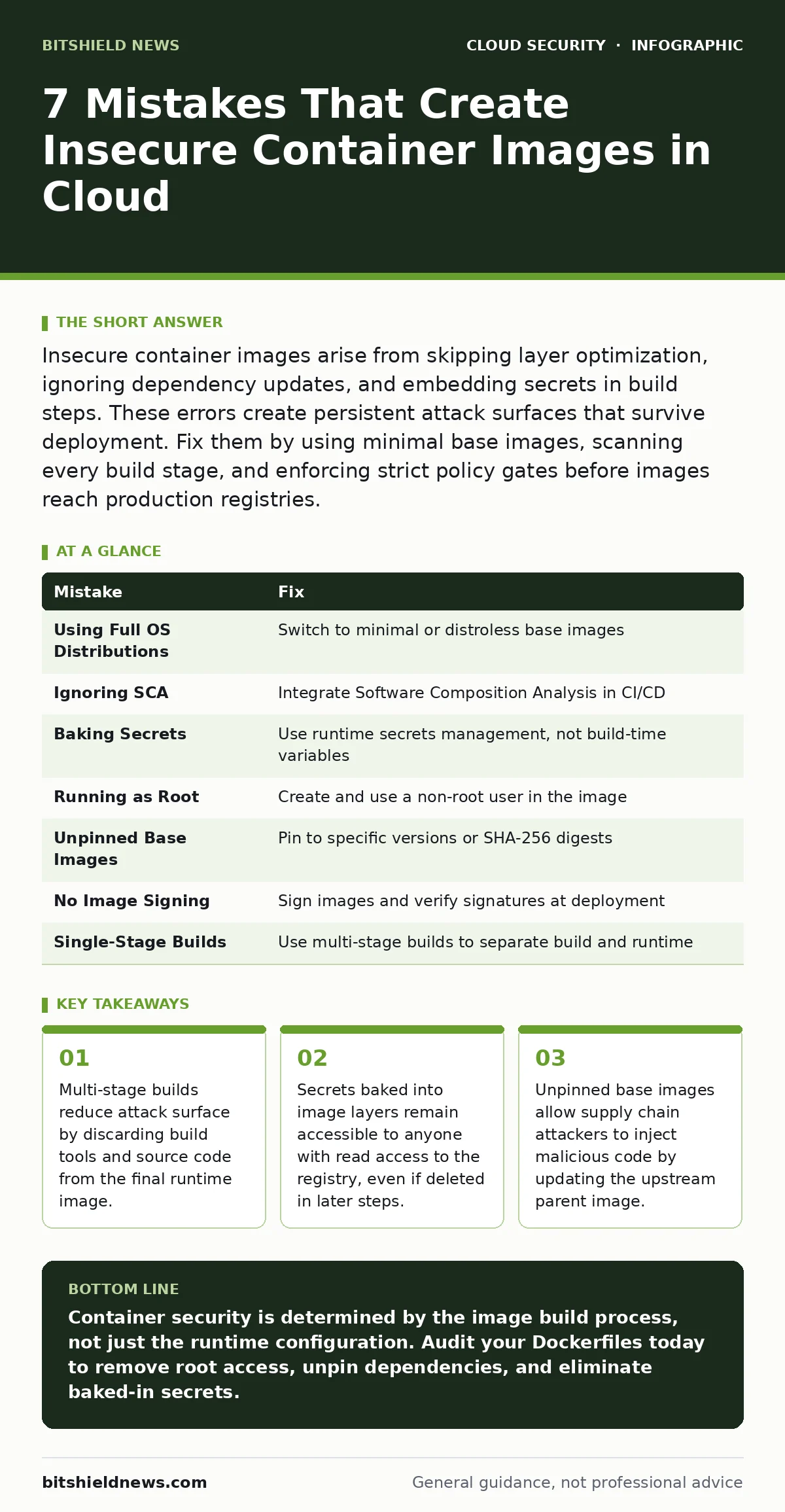
| Mistake | Fix |
|---|---|
| Using Full OS Distributions | Switch to minimal or distroless base images |
| Ignoring SCA | Integrate Software Composition Analysis in CI/CD |
| Baking Secrets | Use runtime secrets management, not build-time variables |
| Running as Root | Create and use a non-root user in the image |
| Unpinned Base Images | Pin to specific versions or SHA-256 digests |
| No Image Signing | Sign images and verify signatures at deployment |
| Single-Stage Builds | Use multi-stage builds to separate build and runtime |
Key takeaways
- Multi-stage builds reduce attack surface by discarding build tools and source code from the final runtime image.
- Secrets baked into image layers remain accessible to anyone with read access to the registry, even if deleted in later steps.
- Unpinned base images allow supply chain attackers to inject malicious code by updating the upstream parent image.
Container security is determined by the image build process, not just the runtime configuration. Audit your Dockerfiles today to remove root access, unpin dependencies, and eliminate baked-in secrets.
Frequently asked questions
How do I check if my container image has secrets?
Use tools like Trivy or Gitleaks to scan your image layers for patterns that match common secret formats, such as API keys or private keys.
Can a container escape its namespace?
Yes, if the container is run with privileged flags or if there is a kernel vulnerability. Always run containers with minimal privileges and keep the host kernel updated.
What is the difference between a vulnerability and a misconfiguration?
A vulnerability is a flaw in the software code, while a misconfiguration is an incorrect setting, such as running as root or exposing unnecessary ports. Both must be addressed.
How often should I scan container images?
Scan every time you build an image. Additionally, schedule periodic scans for images already in your registry to catch newly discovered vulnerabilities in base components.
How this guide was produced: written by the BitShield News editorial team with AI assistance, checked against the public references listed below, and reviewed when the facts change. See our editorial policy or report an error.