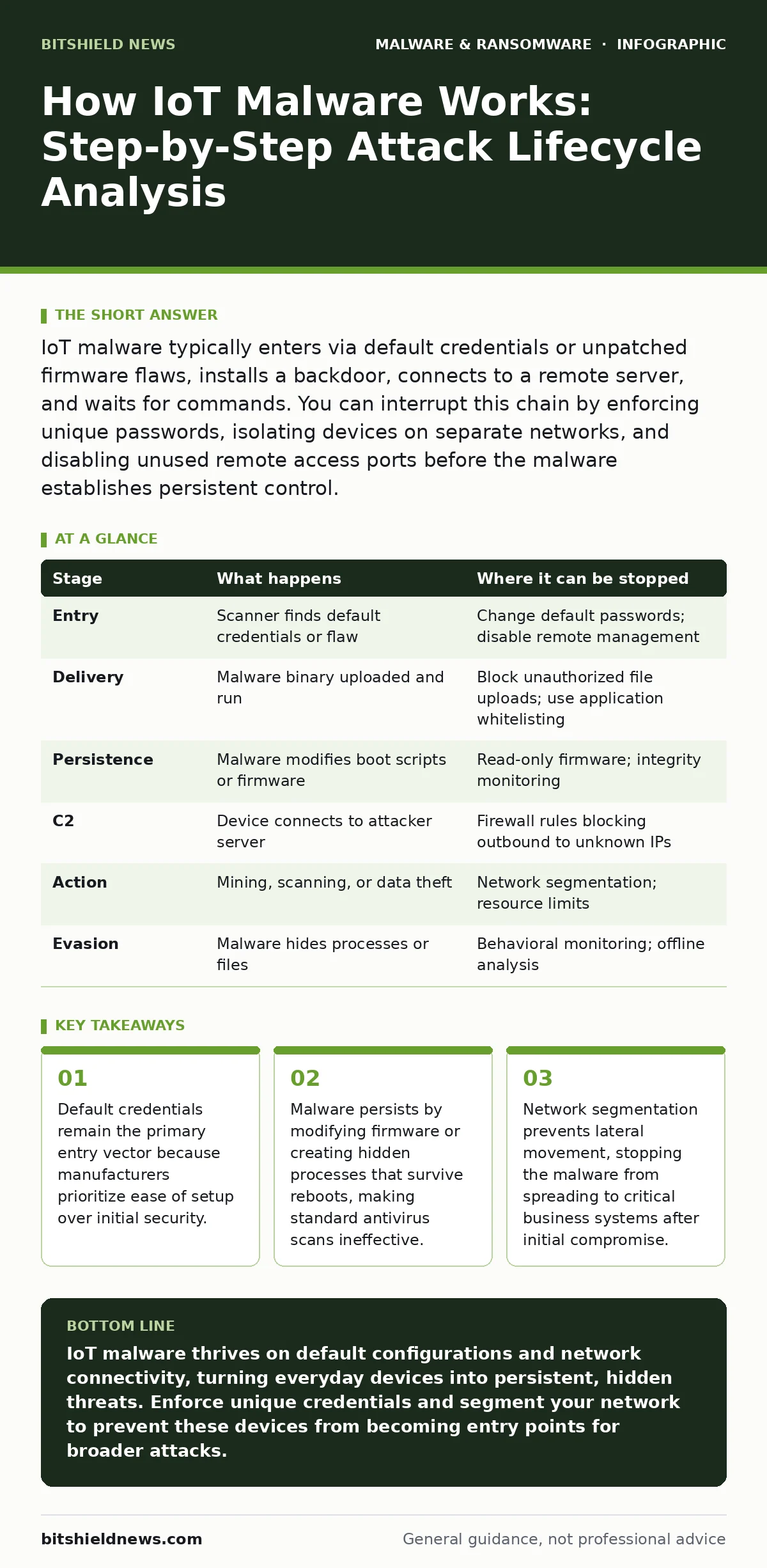
IoT malware typically enters via default credentials or unpatched firmware flaws, installs a backdoor, connects to a remote server, and waits for commands. You can interrupt this chain by enforcing unique passwords, isolating devices on separate networks, and disabling unused remote access ports before the malware establishes persistent control.
The Entry Vector: Exploiting Convenience Over Security
IoT malware rarely breaks through complex cryptographic barriers. Instead, it relies on the path of least resistance created during manufacturing. Manufacturers often ship devices with hardcoded default passwords or universal backdoors to simplify deployment for consumers who lack technical expertise. Attackers use automated scanners to probe public IP ranges for these known weak points. When a device responds with an open login prompt, the malware deposits its payload immediately. This stage exploits the assumption that users will change credentials before connecting the device to the internet.
Payload Delivery and Initial Execution
Once the attacker gains access, the malware must execute code on the device. Most IoT devices run lightweight versions of Linux or proprietary real-time operating systems. The attacker uploads a binary file or a script that matches the device’s specific architecture. Because many IoT devices lack application whitelisting, they execute any file placed in the writable filesystem. The malware often disguises itself as a legitimate system process to avoid detection by simple process monitors. This execution step is silent. The device continues to function normally, masking the intrusion from casual observation.
Establishing Persistence
Execution is temporary if the device reboots. Persistence ensures the malware survives power cycles and firmware updates. The attacker modifies startup scripts or injects code into the firmware image itself. In more sophisticated attacks, the malware creates a hidden user account with root privileges. It may also disable logging features to erase evidence of its presence. This stage turns a temporary intrusion into a permanent tenant. You cannot remove the threat by simply restarting the device or disconnecting it briefly. The malware rebuilds its foothold automatically upon boot.
Command and Control Communication
The compromised device is useless if it cannot receive instructions. The malware establishes a connection to a remote command-and-control server. This communication often mimics normal traffic to evade firewall inspection. It might use standard HTTP or DNS ports, blending in with routine web browsing or name resolution requests. The malware checks in at irregular intervals to avoid pattern detection. When the server sends a command, the device executes it and returns the result. This channel allows the attacker to update the malware or issue new directives without touching the device again.
Resource Harvesting and Lateral Movement
With control established, the malware begins its primary task. This often involves using the device’s processing power for cryptocurrency mining or including it in a botnet for distributed denial-of-service attacks. The malware may also scan the local network for other vulnerable devices. It attempts to replicate itself, moving laterally to expand the attacker’s control. This stage increases the attack surface significantly. A single compromised camera can lead to the infection of an entire building’s network if segmentation is poor.
See also: What Is Command and Control: How Malware Steers Your Systems
Evasion and Maintenance
Modern IoT malware includes mechanisms to detect analysis environments. It may check for virtual machine signatures or pause execution if no network activity is detected for a long period. This makes static malware analysis difficult because the malware appears benign when not connected to its intended environment. The attacker may also deploy rootkits that hide the malware’s files and processes from standard system commands. This maintenance phase ensures the device remains a reliable asset for the attacker’s long-term operations. You must understand these evasion tactics to effectively isolate infected devices.
Interrupting the Lifecycle
You can break this chain at multiple points. The most effective intervention occurs at the entry vector. Enforcing strong, unique credentials prevents the initial scan from succeeding. Network segmentation stops lateral movement by placing IoT devices on a separate VLAN that cannot initiate connections to critical servers. Disabling unused remote access services, such as Telnet or SSH, removes the door the malware uses to enter. Regular firmware updates patch the vulnerabilities the malware exploits for persistence. These measures do not guarantee immunity, but they raise the cost of attack significantly.
| Stage | What happens | Where it can be stopped |
|---|---|---|
| Entry | Scanner finds default credentials or flaw | Change default passwords; disable remote management |
| Delivery | Malware binary uploaded and run | Block unauthorized file uploads; use application whitelisting |
| Persistence | Malware modifies boot scripts or firmware | Read-only firmware; integrity monitoring |
| C2 | Device connects to attacker server | Firewall rules blocking outbound to unknown IPs |
| Action | Mining, scanning, or data theft | Network segmentation; resource limits |
| Evasion | Malware hides processes or files | Behavioral monitoring; offline analysis |
The Hidden Cost of Invisibility
The greatest danger of IoT malware is not the immediate disruption, but the silent accumulation of compromised assets. Unlike smartphone privacy settings, which users actively manage, IoT devices often operate in the background. You may not notice a smart lock checking in with a malicious server until it is too late. The malware uses the device’s low power consumption to hide its resource usage.
By the time you detect the anomaly, the attacker may have already used the device as a pivot point to access more sensitive systems. This latency makes detection difficult. You must assume that any internet-connected device is a potential entry point for remote access trojans or web shells. Treating IoT devices as peripheral rather than critical infrastructure invites this risk. Proactive monitoring and strict access controls are the only reliable defenses against this invisible threat.
Key takeaways
- Default credentials remain the primary entry vector because manufacturers prioritize ease of setup over initial security.
- Malware persists by modifying firmware or creating hidden processes that survive reboots, making standard antivirus scans ineffective.
- Network segmentation prevents lateral movement, stopping the malware from spreading to critical business systems after initial compromise.
IoT malware thrives on default configurations and network connectivity, turning everyday devices into persistent, hidden threats. Enforce unique credentials and segment your network to prevent these devices from becoming entry points for broader attacks.
Frequently asked questions
Can antivirus software stop IoT malware?
Traditional antivirus relies on malware signatures, which are often ineffective against IoT devices due to limited resources and unique architectures. Behavioral monitoring is more effective but requires specialized tools.
How do I know if my IoT device has malware?
Look for unusual network traffic, unexpected reboots, or changes in device behavior. If the device attempts to connect to unknown external servers, it is likely compromised.
Is turning off the device enough to remove malware?
No. If the malware has established persistence by modifying firmware or startup scripts, it will reactivate when the device powers on again. You must reflash the firmware or replace the device.
What is the difference between IoT malware and a backdoor?
A backdoor is a hidden method of bypassing authentication, often left by developers. IoT malware is malicious code that exploits vulnerabilities or backdoors to gain control and perform unauthorized actions.
How this guide was produced: written by the BitShield News editorial team with AI assistance, checked against the public references listed below, and reviewed when the facts change. See our editorial policy or report an error.