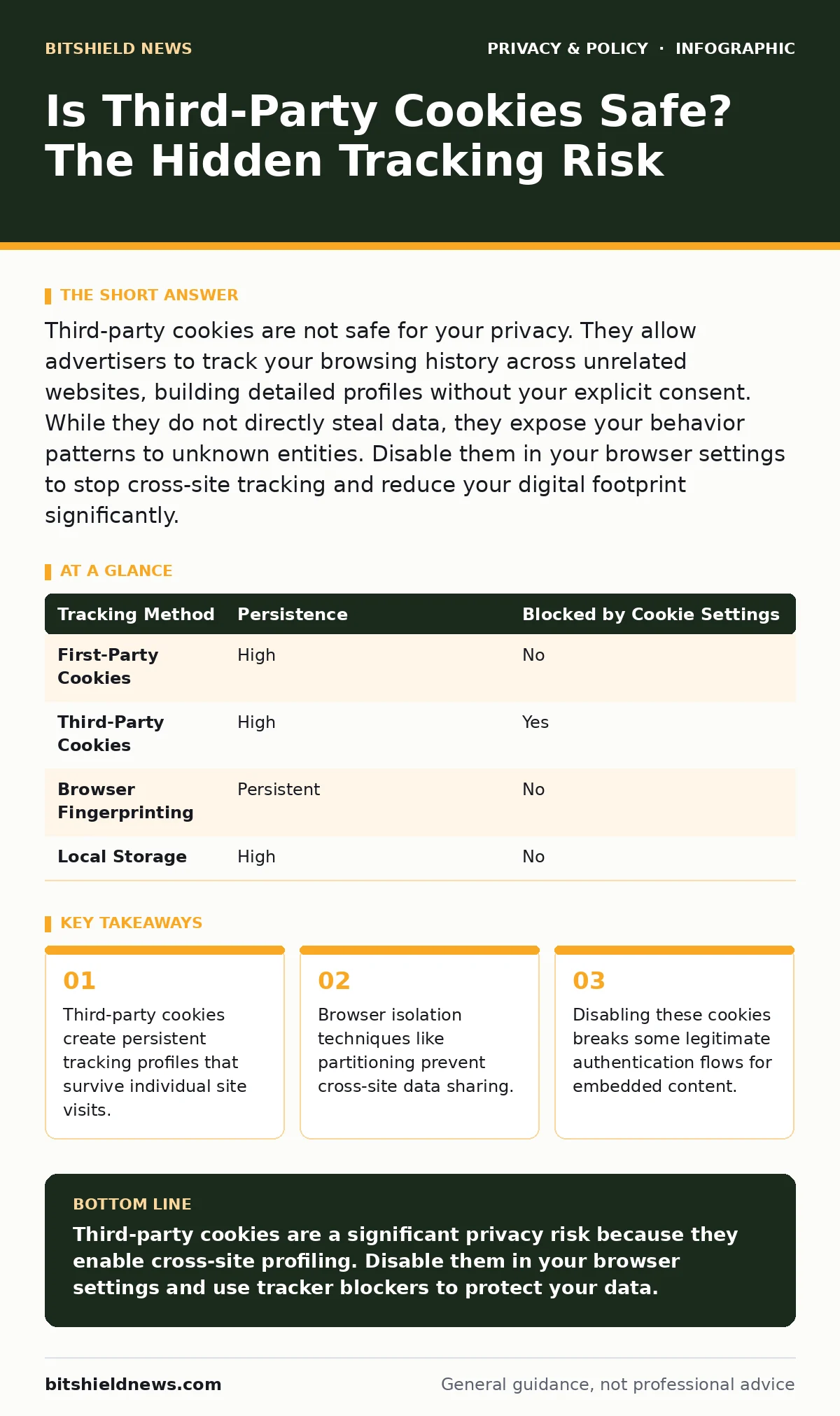
Third-party cookies are not safe for your privacy. They allow advertisers to track your browsing history across unrelated websites, building detailed profiles without your explicit consent. While they do not directly steal data, they expose your behavior patterns to unknown entities. Disable them in your browser settings to stop cross-site tracking and reduce your digital footprint significantly.
Is third-party cookies safe for your privacy?
Third-party cookies are not safe for your privacy because they enable cross-site tracking. These small text files are placed by domains other than the one you are visiting. When you read a news article, a cookie from an advertising network records that visit. When you later visit a shopping site, that same network reads its cookie to know you were at the news site. This mechanism builds a detailed profile of your interests and habits. You lose control over who collects this information and how long they retain it. The privacy risk stems from the aggregation of data points across the entire web, not from a single site.
How do third-party cookies differ from first-party cookies?
First-party cookies are set by the website you are actively visiting. They serve functional purposes, such as keeping you logged into your email or remembering items in a shopping cart. These cookies stay within the domain of the original site. Third-party cookies are set by external services embedded in the page, such as analytics tools or social media widgets. They follow you from site to site. This distinction matters because first-party cookies support the website’s operation, while third-party cookies primarily support advertising and surveillance. Understanding this difference helps you decide which cookies to block without breaking site functionality.
What happens when you block third-party cookies?
Blocking third-party cookies stops external trackers from reading your history across different domains. This action significantly reduces the amount of data available for behavioral advertising. However, it can break certain web features. Some sites use third-party services for login authentication or comment sections. If you block the cookie, the site cannot verify your identity with that service. You may see error messages or be forced to log in repeatedly. The trade-off is between seamless convenience and privacy protection. You must accept that some embedded content will not load or function correctly when these cookies are disabled.
Does blocking cookies stop all tracking methods?
Blocking third-party cookies does not stop all tracking methods. Attackers and advertisers use alternative techniques to identify users. Browser fingerprinting is one such method. It analyzes your device’s unique configuration, including screen resolution, installed fonts, and hardware capabilities. This creates a unique identifier without storing any data on your device. Another method is canvas fingerprinting, which uses subtle rendering differences in HTML5 canvas elements. These techniques persist even when cookies are deleted. You need additional protections, such as privacy-focused browser extensions or hardened browser configurations, to mitigate fingerprinting risks effectively.
How do browsers handle cookie isolation?
Modern browsers use cookie partitioning to limit third-party cookie abuse. This technique isolates cookies so that a tracker can only access data from the specific site where the cookie was set. If you visit Site A and Site B, the tracker’s cookie on Site A remains invisible to Site B. This prevents the aggregation of your browsing history. Partitioning reduces the effectiveness of cross-site profiling while maintaining some functionality for embedded content. It is a structural change in how browsers manage data storage. This approach offers a middle ground between total blocking and unrestricted tracking, though it does not eliminate all privacy concerns.
| Tracking Method | Persistence | Blocked by Cookie Settings |
|---|---|---|
| First-Party Cookies | High | No |
| Third-Party Cookies | High | Yes |
| Browser Fingerprinting | Persistent | No |
| Local Storage | High | No |
See also: Warning Signs of Browser Fingerprinting and How to Block It · Online Tracking Explained: How Your Digital Footprint Is Built and How to Limit It
What are the exceptions to cookie safety?
Some third-party cookies serve legitimate security or functional purposes. Single sign-on services use third-party cookies to allow you to log into multiple sites with one account. If you block these cookies, you lose the convenience of single sign-on. Another exception involves embedded content like video players or maps. These services may require cookies to remember your preferences or play content correctly. Blocking them might result in broken video playback or missing map features. You must weigh the privacy benefit against the functional loss. For most users, the privacy risk outweighs the convenience, but specific workflows may require selective allowance.
How do you manage cookie risks effectively?
You manage cookie risks by combining browser settings with privacy tools. Start by enabling "Block third-party cookies" in your browser preferences. This stops the most common form of cross-site tracking. Next, use a tracker blocker extension to prevent scripts from loading in the first place. This reduces the chance of fingerprinting and other advanced tracking techniques. Regularly clear your browsing data to remove any accumulated first-party cookies. Consider using private browsing modes for sensitive activities, as these modes discard data after the session ends. These steps create layers of protection that address both cookie-based and non-cookie tracking methods.
What is the future of third-party cookies?
The web is moving away from third-party cookies due to privacy regulations and browser changes. Major browsers are phasing out support for unrestricted third-party cookies. This shift forces advertisers to adopt new tracking methods, which may be more invasive or less transparent. You should expect increased use of fingerprinting and server-side tracking. These methods are harder for users to detect and block. Privacy tools must evolve to counter these new techniques. Stay informed about browser updates and privacy extensions. The landscape of web tracking is changing rapidly, requiring continuous adaptation of your security practices.
Key takeaways
- Third-party cookies create persistent tracking profiles that survive individual site visits.
- Browser isolation techniques like partitioning prevent cross-site data sharing.
- Disabling these cookies breaks some legitimate authentication flows for embedded content.
Third-party cookies are a significant privacy risk because they enable cross-site profiling. Disable them in your browser settings and use tracker blockers to protect your data.
Frequently asked questions
Do I need to clear cookies manually?
Clearing cookies manually removes stored data, but it does not stop new cookies from being set. Rely on browser settings to block third-party cookies automatically. Manual clearing is useful for troubleshooting login issues.
Are first-party cookies safe?
First-party cookies are generally safe as they stay within the site you visit. They enable essential functions like login sessions. However, they can still collect data about your behavior on that specific site.
Can I block cookies on mobile browsers?
Most mobile browsers allow you to block third-party cookies in their settings. The options may be buried in the privacy or security menus. Enable this setting to protect your mobile browsing privacy.
Do private browsing modes block cookies?
Private browsing modes discard cookies after you close the window. They do not block cookies from being set during the session. Use private mode for sensitive activities to prevent long-term data retention.
How this guide was produced: written by the BitShield News editorial team with AI assistance, checked against the public references listed below, and reviewed when the facts change. See our editorial policy or report an error.